To switch between panels, swipe left or right or tap their respective icons at the top of the screen.
Tap on the Search button in the bottom left corner to search through active panel’s content.
To close Panels, tap on the Close button in the top right corner.
Panels on tablets
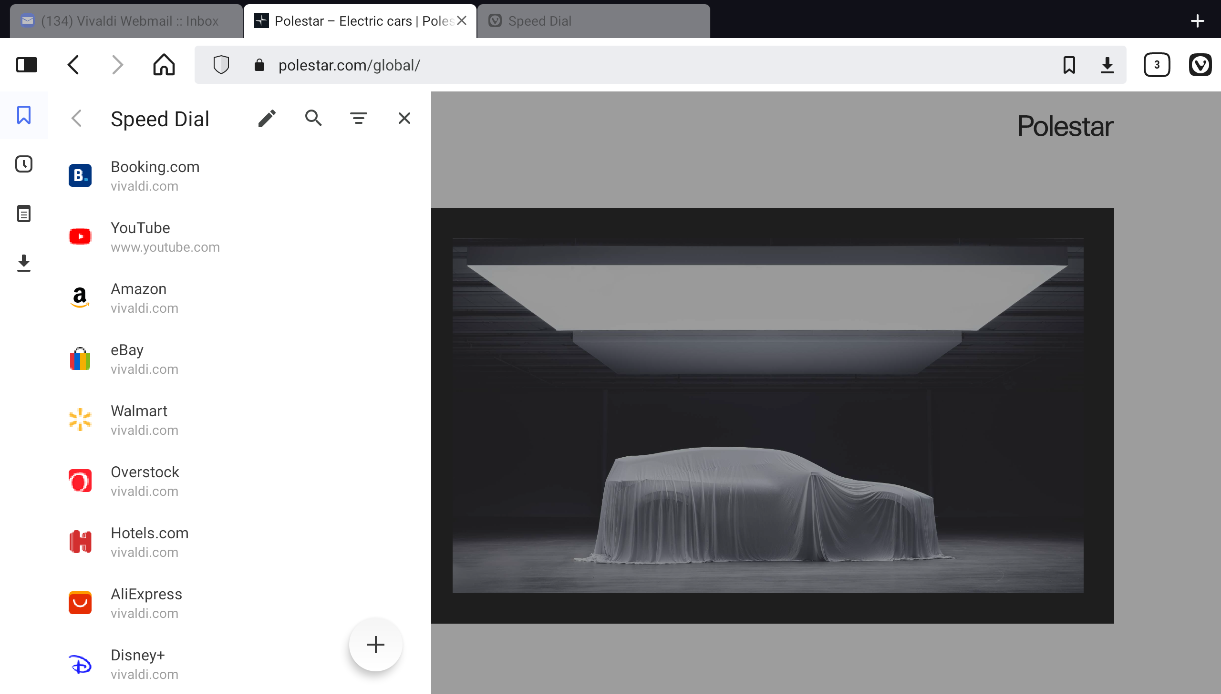
With more screen space available, Panels on tablets and other Android devices with bigger screens (e.g. Polestar’s infotainment system) follow the design of Vivaldi on desktop.
To open Panels on a tablet:
Tap on the Panels button on the left side of the Address Bar. Panels open with the last visited panel.
Tap on the different panel icons listed vertically on the left side to switch between them.
To close the panel:
Tap the Close button in the top right corner of Panels.


 Panels button on the left side of the Toolbar at the bottom of the screen.


 Search button in the bottom left corner to search through active panel’s content.
 Close button in the top right corner.