Forum notifications
This post is also available in:


Notifications
If you wish, you can receive notifications on the forum, to your account’s recovery email or both when:
- someone upvotes your post
- someone you follow posts a new topic
- a new reply is posted in a topic you are watching
- someone starts following you
- you receive a chat message
- you receive a group invite
- someone mentions you
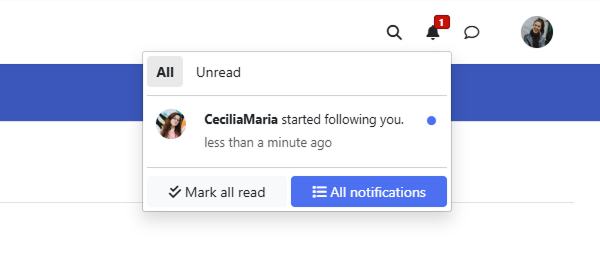
On the forum, to view the latest notifications, click on the bell icon in the top right corner of the page to see the latest notifications.
Click on the notification to open the topic/chat/profile/etc. Click Unread to filter out already viewed notifications. Click the little blue dot to mark a specific notification read. Click Mark all read to dismiss the notification without e.g. going to the topic. Click All notifications to go to the full page view of all notifications.
Notification Settings
To change, which notifications to receive and where, go to your account menu > Settings and apply your preference in the Notifications and Sounds sections.
Forum Digest emails
In addition to notifications, you can receive a Digest email with the latest topics. Adjust the frequency in Settings > Email.
Digest emails will be sent to your account’s recovery email.