Calculator
Ця публікація також доступна такими мовами:


With Vivaldi’s Quick Commands feature you can do various calculations in a blink of an eye.
Open Quick Commands by pressing F2 / ⌘ E on your keyboard and start typing the equation. For example, “5166/123”, “sqrt 9”, etc.
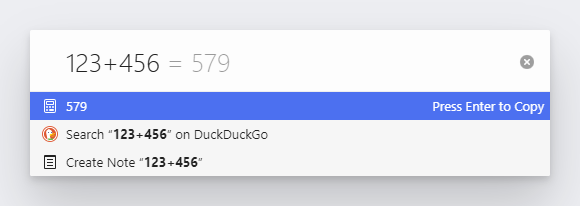
The solution will appear below the input field and in a faded color also after the equation in the input field. When you press Enter, the solution will be automatically copied to your clipboard.
Types of calculations currently available:
- Addition (x+y)
- Subtraction (x-y)
- Multiplication (y*z or y x z)
- Division (x/y)
- Remainder (x%y)
- Power / exponentiation (x^y)
- Root (sqrt x)
- Factorial (x!)
- Logarithms (ln x, log x, log10 x)
- Trigonometric functions (sin x, cos x, tan x)
- Inverse trigonometric functions (asin x, acos x, atan x)
- Hyperbolic functions (sinh x, cosh x, tanh x)
- Inverse hyperbolic functions (asinh x, acosh x, atanh x)
- Round up/down/nearest (ceil x, floor x, round x)
- Absolute / magnitude (abs x)
Was this helpful?
Thanks for your feedback!